-
Written by
Caitlin Porter
-
Published on
Jan 07, 2026
Share On
Table of Contents
- Introduction
- The Harvard P&G Study: Teams + AI Outperform Everything Else
- The Evolving Organization: From Pyramid to Pentagon
- Three Practical Steps for Leaders in 2026
- Recent AI Updates: December Releases
- What to Expect in Enterprise AI This Year
- Actionable Takeaways
- Conclusion
Introduction
Leadership drives AI adoption. When leaders treat ChatGPT as just another email-writing tool, teams stay stuck in surface-level usage. When leaders use AI as a thinking partner for strategic planning, OKRs, and decision-making, organizations transform how they compete.
The data backs this up. Research from Harvard Business School and Procter & Gamble shows that teams equipped with AI produce higher-quality solutions than any other configuration. Individual contributors with AI outperform teams without it, but the combination of diverse teams plus AI access creates results that land in the top 10% of solutions.
This article explores how leaders build AI into their daily leadership practice. You'll learn three practical frameworks: voice-first interaction with AI models, turning business books into custom coaching tools, and building personalized executive coaches that understand your company context. You'll also see recent AI releases from December and what they mean for enterprise leaders in 2026.
The Harvard P&G Study: Teams + AI Outperform Everything Else
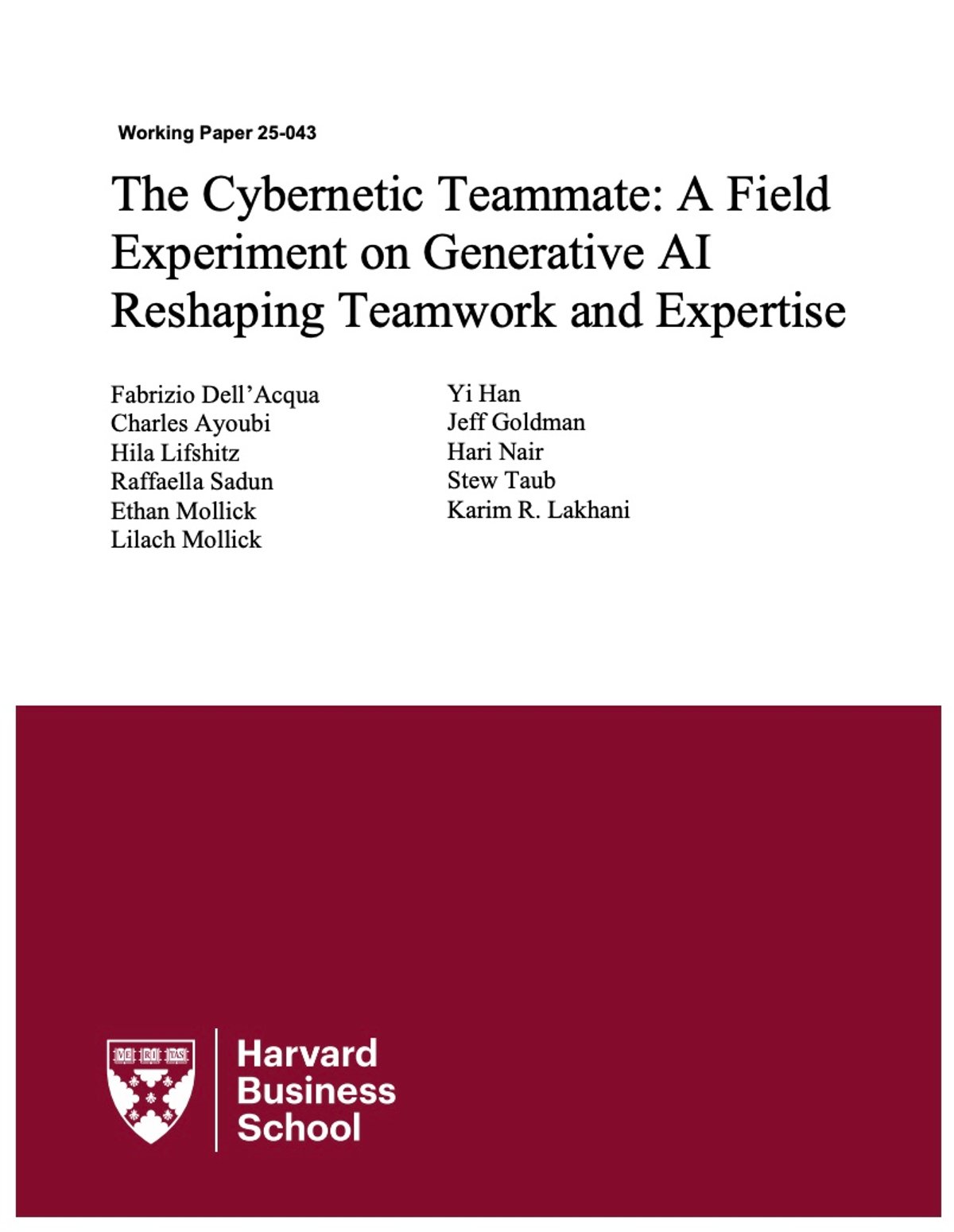
In March 2025, Harvard Business School and Procter & Gamble published research that quantifies how AI impacts team performance. They brought together 776 P&G professionals from the US and Europe and split them into four groups: individuals without AI, teams without AI, individuals with AI (ChatGPT 4.0), and teams with AI.
Each group worked on real-world branding and campaign tasks. P&G manufactures everything from shampoos to diapers, so teams developed campaigns, created branding exercises, and solved authentic business problems. A blind panel of P&G executives scored the solutions without knowing which group produced them or whether AI was involved.
Quality Results: Teams + AI Win
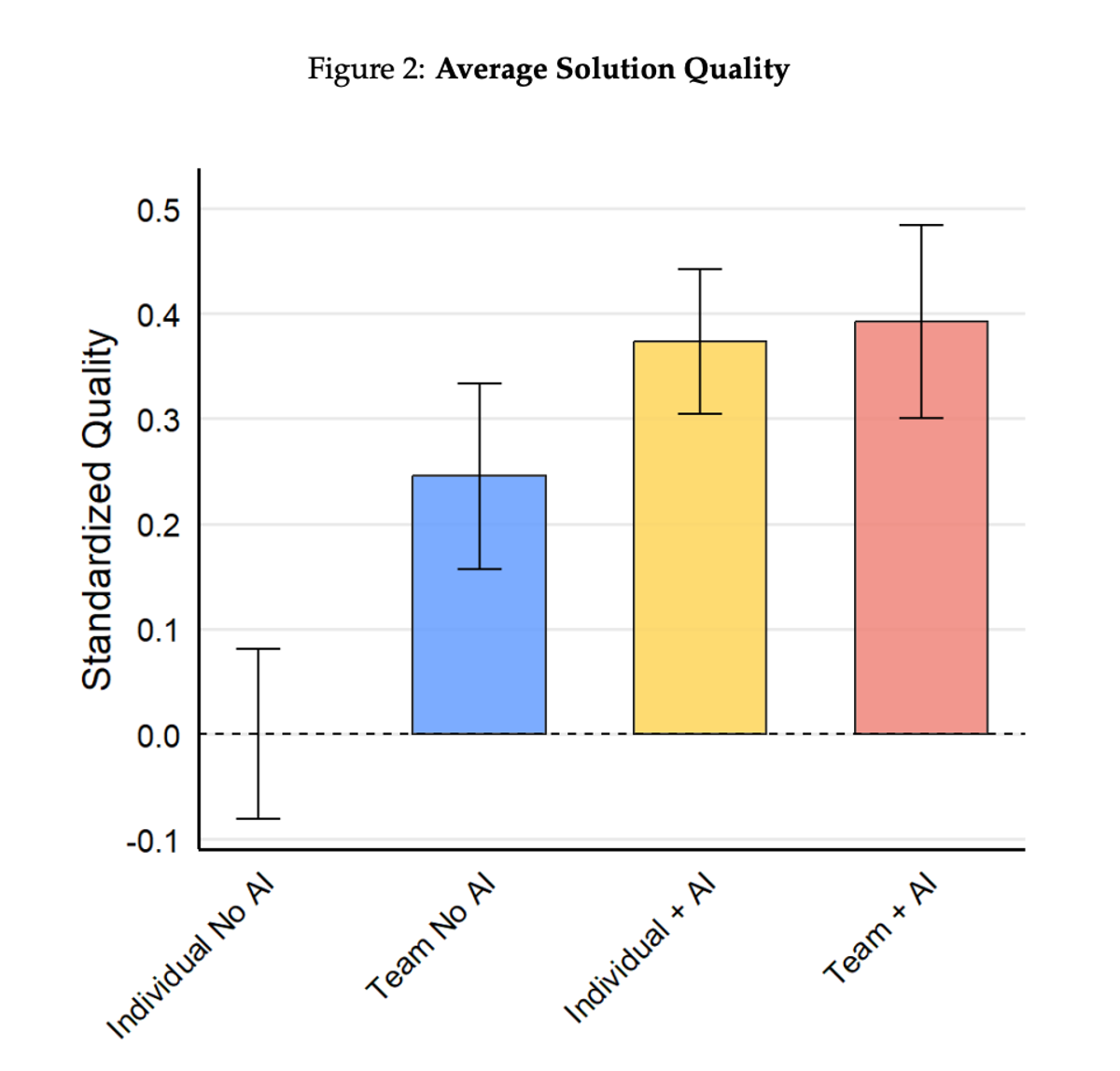
The first chart measured standardized quality of solutions. The benchmark was set at zero for individuals working without AI. Teams without AI scored higher, which makes sense—two perspectives beat one. Individual contributors with AI scored even higher, outperforming teams that lacked AI access.
Teams with AI produced the highest quality solutions. The combination of diverse thinking plus AI capability created better results than any other configuration.
Top 10% Solutions: Where Breakthrough Ideas Come From
Quality matters, but breakthrough solutions matter more. When researchers filtered for only the top 10% of all solutions, they found something striking. About 6% of individual-without-AI solutions made this cut. Teams without AI scored marginally better at 7-8%. Individuals with AI hovered around the same range.
Teams with AI jumped to 15%. Fifteen percent of their solutions landed directly in the top 10% of all submissions.
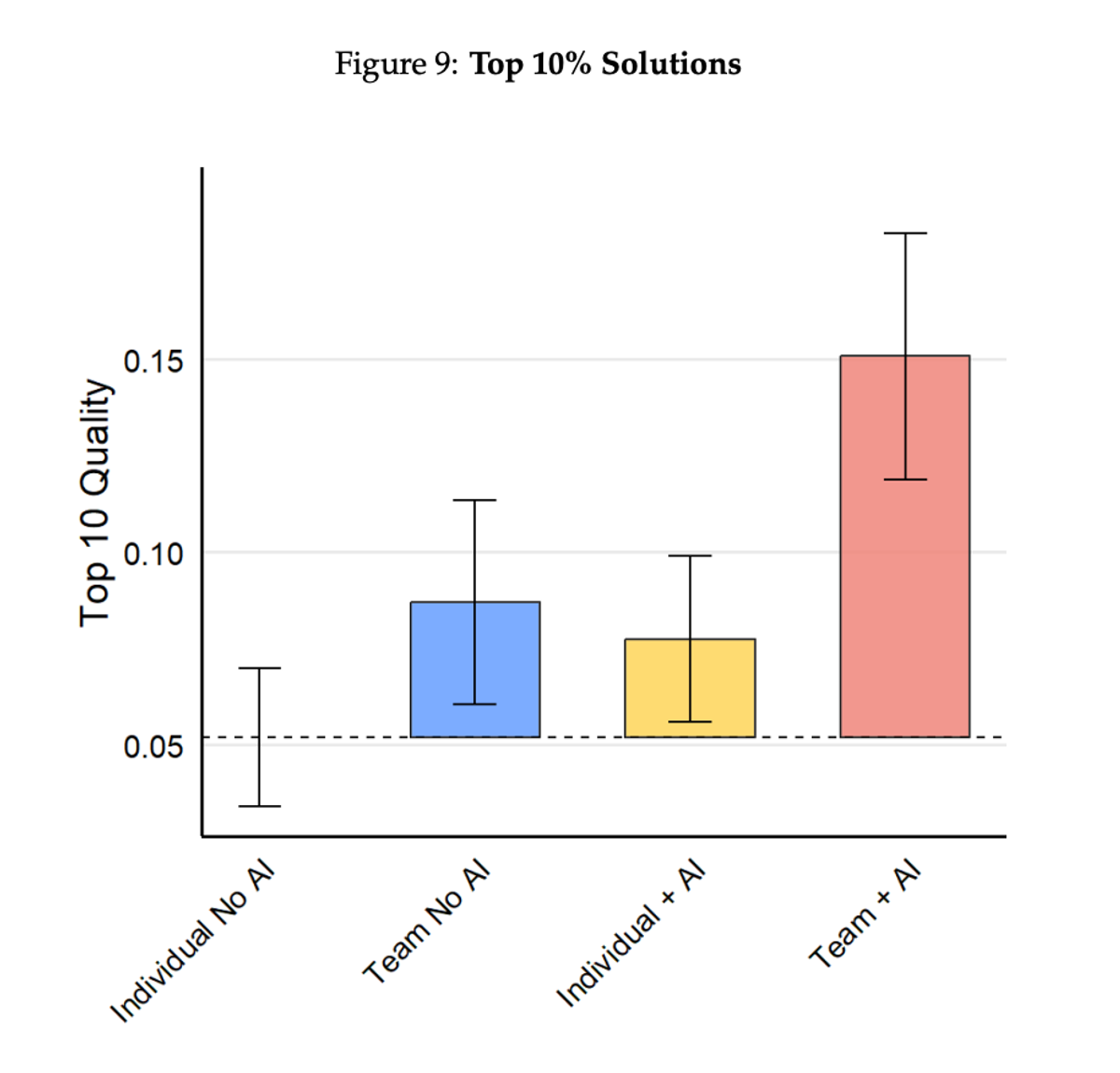
As the research demonstrates: "Teams with AI don't just produce better average work—they produce breakthrough solutions at twice the rate of any other configuration."
This matters for leaders thinking about AI strategy. You need both diverse perspectives and AI capability. The answer isn't to reduce headcount and give individuals AI tools. The answer is to empower teams with AI and watch quality compound.
How AI Breaks Down Organizational Silos
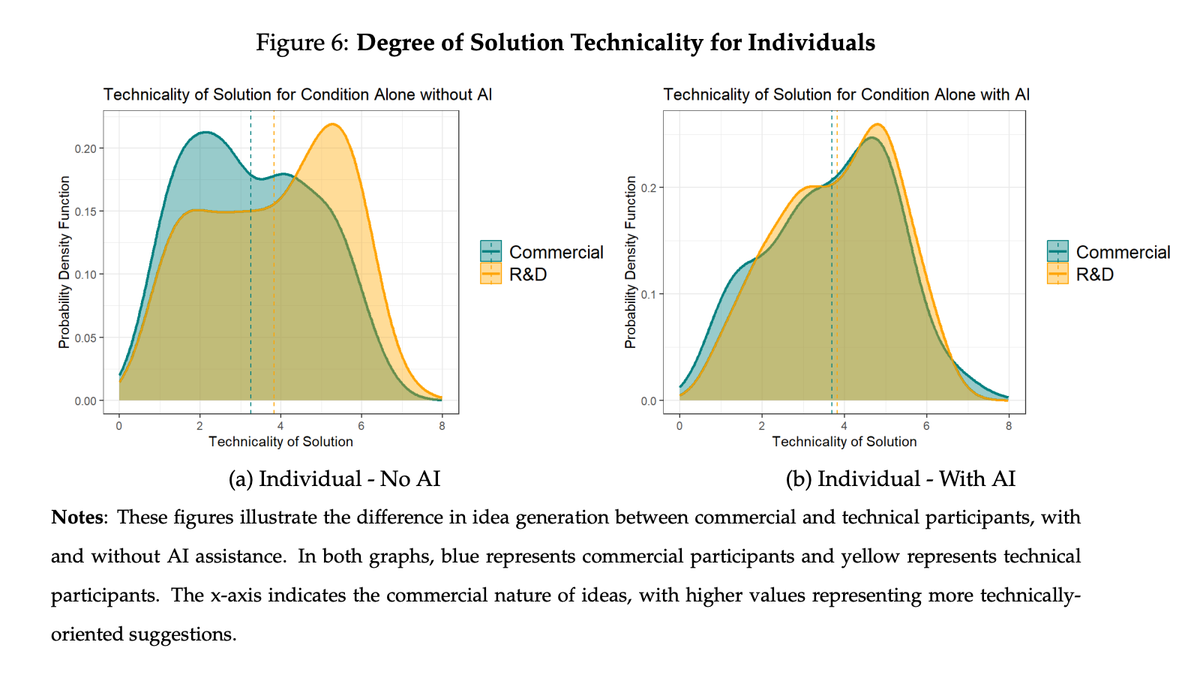
The third finding reveals why teams with AI perform so well. The study compared solutions by the background of the person or team creating them. Without AI, people from commercial backgrounds (marketing, sales, branding) produced solutions focused on logos and brand positioning. People from R&D and technical backgrounds produced solutions focused on changing product compounds or technical specifications.
With AI, this gap disappeared. Marketing professionals with AI access started proposing technical solutions. R&D professionals with AI access developed sophisticated branding campaigns. AI broke down functional silos by giving everyone access to knowledge and perspectives outside their domain expertise.
This matters when you think about cross-functional initiatives. AI doesn't just make individuals faster—it makes teams more collaborative and solutions more holistic.
The Employee Experience Benefit
The study also measured emotional impact. Teams using AI reported the highest increase in positive emotions and the highest decrease in negative emotions while working on tasks.
Think about what creates positive emotions at work: moving fast, accessing information instantly, being creative, making progress. Think about negative emotions: not knowing the answer, waiting for the right person, feeling constrained by knowledge gaps.
AI removes friction. You don't wait for the expert to be available. You don't guess at answers. You move forward with confidence, and your team feels that momentum.
For leaders, this translates to retention and engagement. Companies that enable teams with AI don't just get productivity gains—they get happier employees who stay longer.
The Evolving Organization: From Pyramid to Pentagon
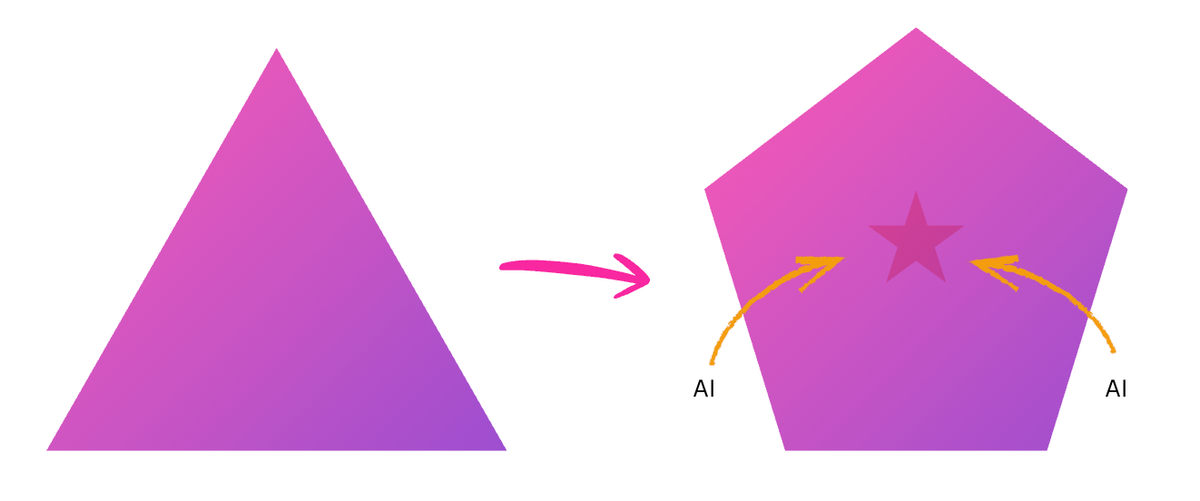
Traditional organizational structures look like a pyramid. The CEO sits at the top, followed by senior executives, middle management, and a large base of individual contributors doing the work. Consulting firms like Accenture and Deloitte built entire business models on this structure.
AI changes the shape. When you empower individuals with AI, you need fewer people in the bottom corners of the pyramid. That small group of P&G professionals with AI didn't need to delegate research tasks, documentation, or testing to junior team members. They got it done themselves.
The Pentagon Model
Organizations in 2026 and beyond look more like pentagons than pyramids.
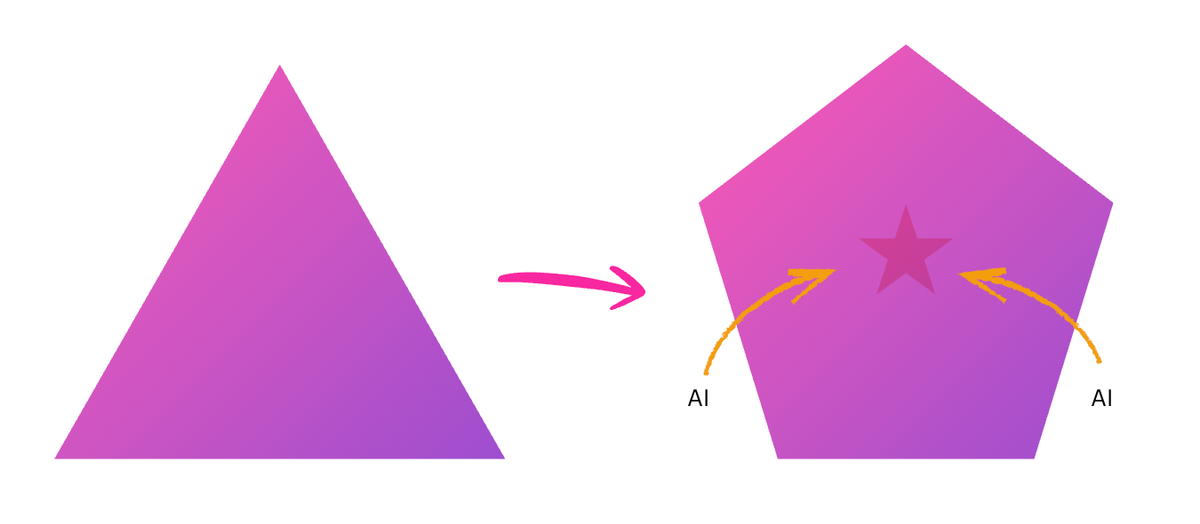
The bottom corners shrink. The sides expand. You still have leadership at the top and a star of highly capable, AI-enabled individual contributors in the center, but the organizational structure fundamentally shifts.
This isn't about eliminating roles. It's about elevation. How do you move people from the bottom corners as quickly as possible into becoming highly powered, AI-enabled contributors working in the business? As your organization grows top-line revenue and scales faster, you don't need to add corresponding headcount at the bottom of the pyramid.
Leaders who grasp this reshape their hiring, training, and promotion strategies now, not in two years when the shift is obvious to everyone.
Three Practical Steps for Leaders in 2026
Here's how leaders build AI into their daily practice. These three frameworks work whether you're a CEO, VP, or team lead.
Start Speaking to Your Computer
Stop typing. Speak to your AI tools instead.
Wispr Flow (wisprflow.ai) is a free download for Mac and Windows that converts speech to text wherever you place your cursor. Hold down the function key (on Mac), talk, and watch formatted text appear in your email, WhatsApp message, ChatGPT prompt, or Google Doc.
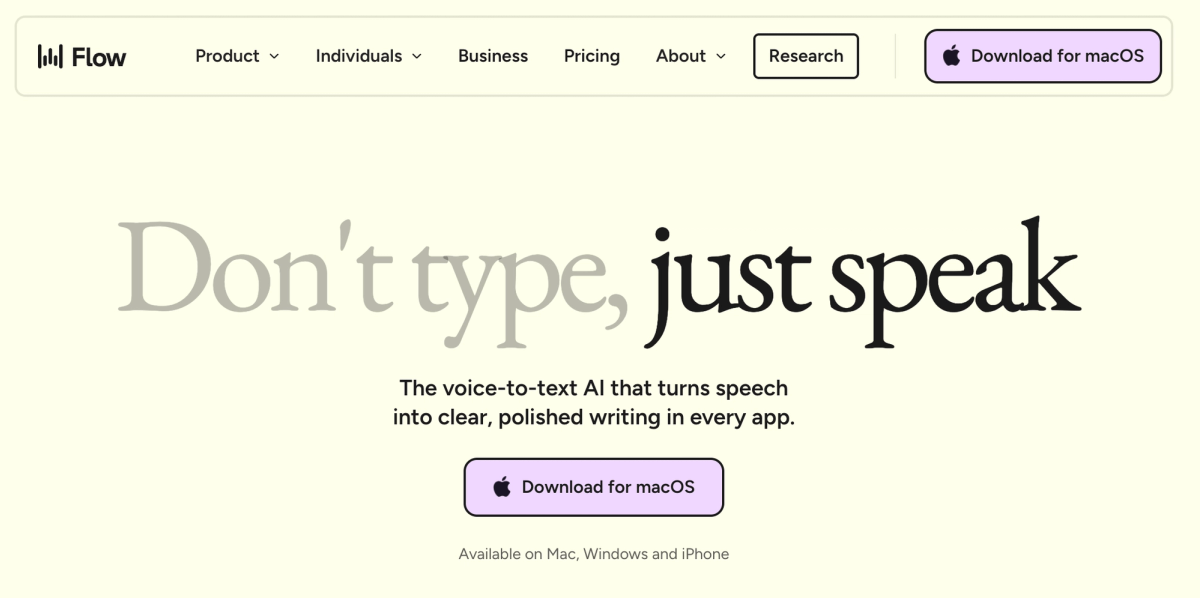
Why this matters: AI models thrive on context. The more information you provide, the better they perform. You give dramatically more context when you speak than when you type. Speaking is faster, more natural, and captures nuance that typed prompts miss.
The barrier is psychological, not technical. Most people resist talking to their laptops, especially in offices or meeting rooms. Practice in a comfortable environment first. Use it at home to write texts or draft documents. After a few sessions, you'll feel confident using voice in any setting.
Voice-first interaction fundamentally changes how you use AI. Instead of typing short prompts like "Write an email to John about the proposal," you speak naturally: "I need to send John an email about the Q1 sales proposal we discussed last week. He had concerns about pricing in the enterprise tier, and I want to address those while reinforcing why the implementation timeline we proposed makes sense given their Q2 launch. Keep it friendly but direct."
That's 50 words of context spoken in 15 seconds. Typing it would take two minutes and feel tedious.
Turn Your Business Books into Custom GPTs
Leaders rely on strategic frameworks. Playing to Win by A.G. Lafley and Roger Martin teaches the five cascading questions for strategy. Radical Candor by Kim Scott structures feedback conversations. Amp It Up by Frank Slootman defines high-performance culture.
Instead of rereading these books, turn them into custom GPTs that coach you through their frameworks.
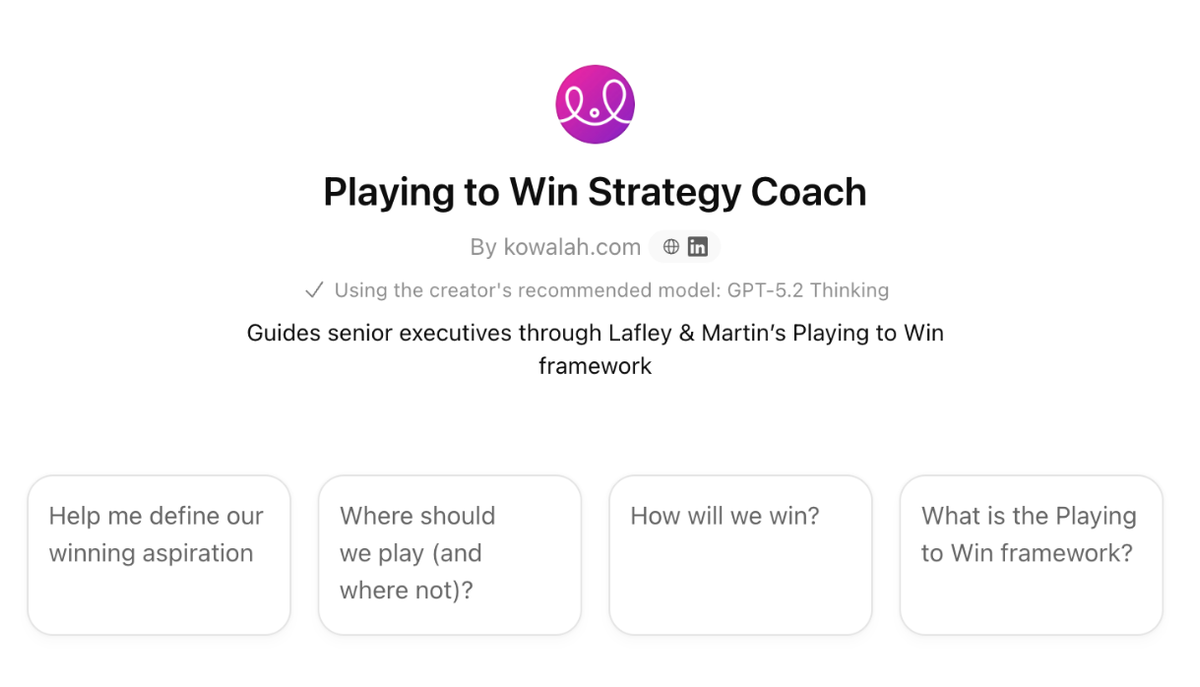
ChatGPT's custom GPT feature (available in ChatGPT Business and Enterprise) lets you create AI assistants trained for specific workflows. You don't need to upload the entire book—ChatGPT already has most business books in its training data. You just need to provide instructions for how you want it to interact.
Example: Playing to Win Strategy Coach
The Playing to Win framework consists of five cascading questions:
- What is our winning aspiration? (Where do we want to be?)
- Where will we play? (Which markets, customers, channels?)
- How will we win? (What's our competitive advantage?)
- What capabilities must be in place? (What do we need to build?)
- What management systems are required? (How do we measure and govern?)
A custom GPT turns this into an interactive strategy session. Instead of staring at a blank document, you talk with a coach that asks probing questions, challenges assumptions, and helps you articulate strategy.
To build this GPT:
- Go to ChatGPT and click "Explore GPTs"
- Click "Create" and describe what you want: "Act as a strategy coach using the Playing to Win framework by Lafley and Martin"
- Add instructions for how it should behave: "Guide me through the five cascading questions. Ask one question at a time. Challenge my answers. Help me get specific."
- Save and start using it
You can build GPTs for any framework: OKR planning, customer interview analysis, performance review preparation, board presentation structure.
The Next Frontier: AI That Knows Your Business
Custom GPTs work for frameworks, but the next evolution goes further. Imagine AI that understands your strategic priorities, reads your internal documents, and actively manages your operating plan—not just when you ask, but proactively.
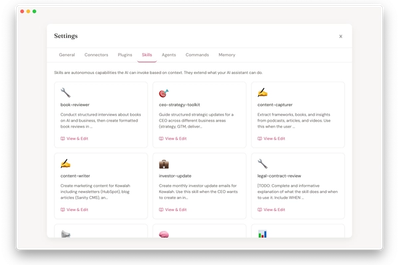
This is where enterprise AI heads this year. Tools like Claude Skills and similar agent platforms connect to your company context, remember past decisions, and execute complex workflows autonomously. A CEO might work with a strategy agent that challenges pricing decisions against documented market positioning, or reminds them why they decided against certain hiring plans three months ago.
The shift is from "AI that answers questions" to "AI that holds you accountable to your own strategy." It doesn't just respond—it navigates your full context, connects dots across conversations, and prevents strategic drift.
This level of personalization isn't for every leader to build themselves. But understanding what's possible helps you evaluate the next generation of executive tools entering the market. The companies building AI deeply integrated with their strategic processes will operate with a different level of clarity and consistency than competitors still treating AI as a glorified search engine.
Recent AI Updates: December Releases
Last month saw multiple major releases from OpenAI and Google. These updates matter for leaders executing AI strategy this year.
ChatGPT 5.2: Professional Work Focus
OpenAI released ChatGPT 5.2 less than 30 days after version 5.1—an unusually fast release cycle. The company called "Code Red" after Google's Gemini 3 Pro topped benchmarks and the new image generator Nano Banana dominated social media.
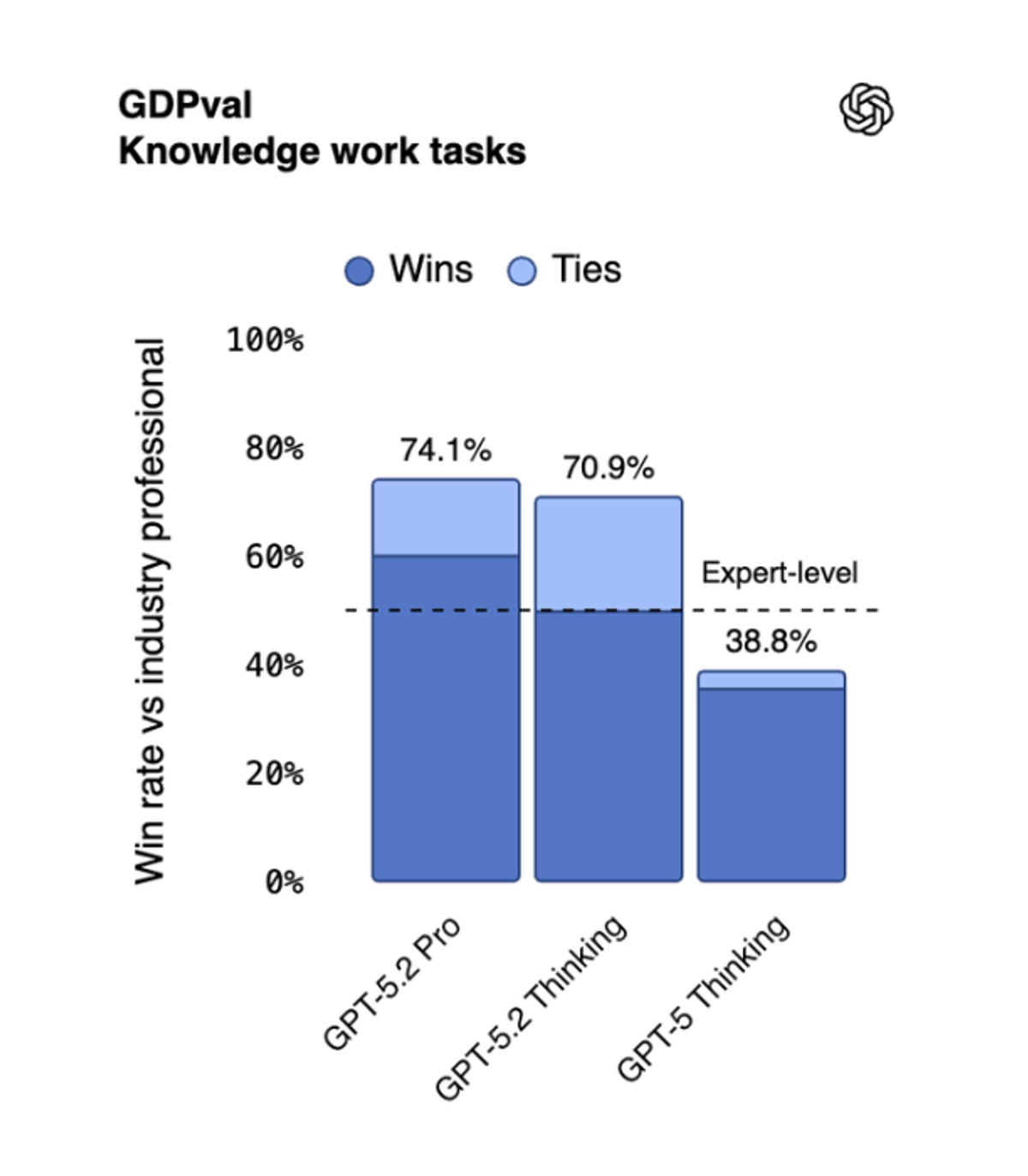
ChatGPT 5.2 targets professional knowledge work. The benchmark used is GDP VAL (General Diagnostic Professional Value), which tests AI against human specialists in contract negotiation, procurement, sales, engineering, and scientific work.
Key finding: ChatGPT 5.2 Thinking mode now beats expert-level human professionals 38.8% to 70.9% of the time when evaluators compare solutions blind. Evaluators preferred the AI-generated solution over the human specialist solution in tasks like Excel modeling, complex document analysis, and strategic planning.
For leaders, this means two things:
- Default to Thinking mode for strategic work. The auto mode defaults to instant response using a lighter model. Thinking mode takes longer but delivers dramatically better results for complex tasks.
- Long context retention improved. Previous models struggled to maintain focus as conversations grew longer. ChatGPT 5.2 retains task focus even with 256,000 tokens of context (roughly 500 pages of text).
ChatGPT Images 1.5: Text and Editing Breakthrough
OpenAI upgraded image generation with Images 1.5 to compete with Google's Nano Banana. The improvements focus on text rendering and selective editing.
Text rendering: Previous versions struggled with spelling. Images 1.5 renders text accurately, even with complex formatting. This matters for creating blog headers, training materials, social media graphics, and presentation visuals.
Selective editing: You can now select a region of an image, describe changes, and watch the AI update just that area while keeping everything else identical. Example: Change a skier's blue jacket to green with a frog logo on the back, without altering the mountain background, other people, or restaurant sign.


Practical application: Leaders create custom training materials, internal communications graphics, and branded content without waiting for designers.
What to Expect in Enterprise AI This Year
Three trends define enterprise AI in 2026: models, agents, and enterprise focus.
Models: Power Continues to Accelerate
A year ago, we had ChatGPT 4.0, Gemini 2.5, and Claude 3. Now we have ChatGPT 5.2, Gemini 3 Pro, and Claude Opus 4.5. Model capability compounds faster than most leaders realize.
By the end of 2026, these models will handle tasks that seem impossible today. For most enterprise work use cases, models are already powerful enough—speed and capability just keep improving.
Agents: Tools That Take Action
An agent is AI with tool access. It doesn't just answer questions—it reads documents, updates systems, pulls information from external sources, and executes workflows.
Enterprise-grade agents are already in production at forward-thinking companies. These systems qualify leads, draft proposals, manage vendor communications, conduct screening interviews, and handle complex multi-step workflows. The key difference: they pick which tools to use and when, adapting their approach based on context.
This year, agents move from early adopter territory to mainstream enterprise deployment. The leaders who understand agent capabilities now will be positioned to implement them strategically rather than reactively.
Enterprise: Real Business Problems, Not Consumer Toys
Consumer AI gets attention—fun images, voice mode, creative writing. Enterprise AI solves business problems: contract analysis, financial modeling, strategic planning, customer support automation.
Companies like Anthropic (makers of Claude) focus explicitly on enterprise use cases. Their tools integrate with corporate systems, maintain security standards, and handle confidential information appropriately.
Leaders should focus on enterprise-grade solutions, not consumer tools repurposed for work. The reliability, security, and integration capabilities differ dramatically.
Actionable Takeaways
Here's what to do next:
- Download Wispr Flow and practice voice interaction. Spend 30 minutes today using voice to write emails, texts, or notes. Build confidence in a comfortable environment before using it in high-stakes work situations.
- Create your first custom GPT for a strategic framework. Pick one book or framework you use regularly (Playing to Win, OKRs, MEDDPICC, Radical Candor). Build a GPT that coaches you through it. Use it for your next strategic planning session.
- Audit your team's AI access and training. Who has ChatGPT Business or Enterprise? Who's been trained? Who's using AI daily vs. occasionally? Create a plan this quarter to close gaps.
- Evaluate enterprise AI tools for your specific use case. If you're in sales, look at AI-powered CRM intelligence. If you're in operations, explore AI for vendor management and project tracking. Test tools with real business problems, not generic demos.
- Set AI-enabled performance expectations. Make AI usage part of how you evaluate performance this year. "How are you using AI to accelerate your work?" becomes a standard 1:1 question.
Conclusion
Leadership determines whether AI transforms your organization or becomes another underutilized tool. The P&G research proves that teams with AI outperform every other configuration—but only if leaders model effective usage, provide access, and create environments where AI experimentation is expected.
The three practical steps—voice interaction, custom GPTs, and executive coaching tools—give you concrete ways to build AI into daily leadership practice. You don't need to understand transformer architecture or prompt engineering theory. You need to use these tools consistently for strategic thinking, planning, and communication.
As organizations shift from pyramids to pentagons, leaders who empower teams with AI will scale faster without ballooning headcount. They'll produce higher-quality solutions, retain happier employees, and break down functional silos.
The window to lead in AI adoption is open now. Start speaking to your computer. Turn your frameworks into coaching tools. Build AI into how you lead.