-
Written by
Charlie Cowan
-
Published on
Dec 03, 2025
Share On
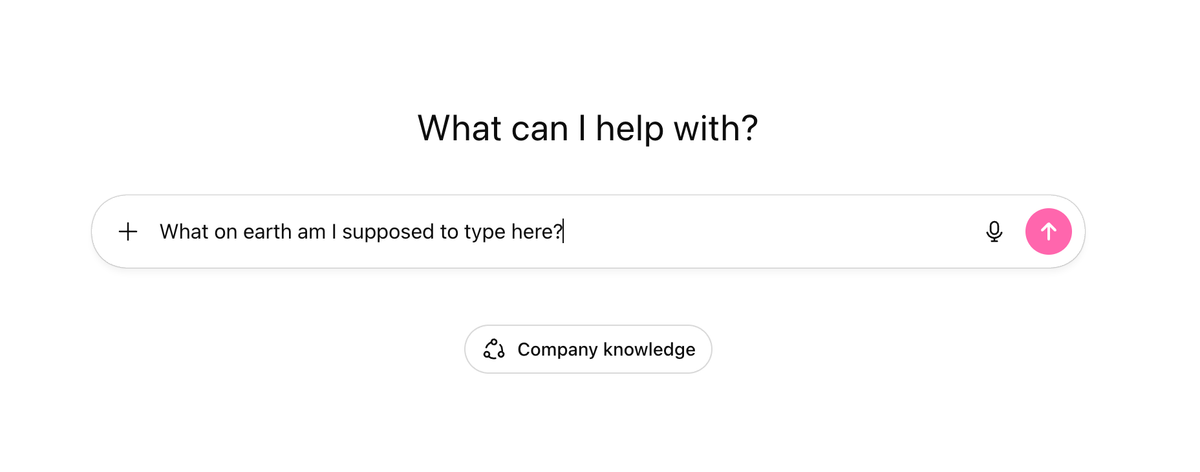
The Blank Screen Problem
Your organisation bought ChatGPT licenses. The rollout went smoothly. Training completion hit 80%.
Then you checked actual usage data: crickets.
Here's what happened. You gave your team the most powerful productivity tool ever created, and they opened it to find... a blank text box. No guidance. No starting point. Just a cursor blinking at them, waiting....
Your teams end up typing the same questions that they used to ask Google Search - what is, who is, when was....
This is the adoption gap that kills AI rollouts. Not resistance. Not technical issues. Just the paralysis of not knowing where to start.
Why "Just Play With It" Doesn't Work
The standard advice for ChatGPT adoption is to encourage experimentation. Let people explore. They'll figure it out.
That approach fails for three reasons:
1. Busy people don't have time to experiment
Your sales director has a pipeline to manage. Your finance team has month-end closing. Nobody has spare hours to discover ChatGPT's capabilities through trial and error.
2. Bad first experiences kill momentum
Someone tries a vague prompt, gets a generic response, decides "AI doesn't really work," and never opens ChatGPT again. You've lost them.
3. People don't know what's possible
ChatGPT can write prompts, plan OKRs, surface relevant GPTs from a library of thousands. But your team doesn't know these capabilities exist, let alone how to access them.
The blank screen isn't a feature. It's a barrier.
The Accelerator Approach
Kowalah Accelerators flip the model. Instead of asking teams to figure out ChatGPT themselves, you hand them ready-made solutions for tasks they already do.
We like to use the analogy of LEGO bricks.

If you are given a big box of bricks it can be hard to know what to build with it - "You can build anything" doesn't help.
But when you buy a LEGO kit you have a nice picture on the box and you can visualise the end result.

This is where Kowalah Accelerators come in.
50+ prebuilt solutions across three categories:
- Prompt Libraries – Pre-written prompts for meeting planning, executive scheduling, decision-making, strategic reflection
- Pre-Built GPTs – Deployable AI assistants for specific workflows, ready to copy into your workspace
- Training Materials – Video walkthroughs and playbooks organised by department
Each Accelerator solves a specific problem. Your team opens ChatGPT with a clear purpose, gets immediate value, and builds confidence to explore further.
Each is ready to copy into your ChatGPT Enterprise workspace, customise to your own context, and deploy across the company.
Three Accelerators That Drive Adoption
1. Prompt Writer
The problem it solves: Your team knows they should use ChatGPT, but they're not prompt engineers. Their instructions are too vague, and the outputs are mediocre.
What it does: Prompt Writer transforms rough ideas into structured, effective prompts. Describe what you need in plain English, and it generates a professional-grade prompt you can use immediately.
Why it matters: Teams stop blaming ChatGPT for "not understanding" and start getting results. One well-structured prompt saves 30 minutes of back-and-forth.
Try it: Instead of typing "write me a sales email," use Prompt Writer to build a prompt that specifies your prospect's industry, their likely objections, your unique value proposition, and your desired tone. The difference in output quality is dramatic.
2. Find a GPT
The problem it solves: OpenAI's GPTs are a fantastic way of scaling your processes, policies and best practices across the organisation. Finding the right one for your specific need takes hours of browsing and testing.
What it does: Find a GPT acts as your personal GPT curator. Describe what you're trying to accomplish, and it surfaces relevant GPTs from across the library, explaining what each one does and when to use it.
Why it matters: Teams discover capabilities they didn't know existed. A marketing manager looking to improve ad copy finds a specialist GPT for that exact task. A project manager discovers workflow assistants that integrate with their tools.
Try it: Ask Find a GPT: "I need help preparing for board meetings and summarising complex documents for executives." Watch it surface GPTs you'd never have found through manual search.
3. OKR Writer
The problem it solves: Every quarter, leaders spend hours crafting objectives and key results. The process is manual, the wording is inconsistent, and the results often lack measurable specificity.
What it does: OKR Writer guides you through structured questions about your goals, constraints, and success metrics, then generates properly formatted OKRs that are ambitious but achievable.
Why it matters: Strategic planning sessions become productive instead of frustrating. Teams align faster because everyone's working from the same framework.
Try it: Feed OKR Writer your team's top priority for next quarter. Compare its output to the OKRs you wrote manually last time. Most leaders find the AI-assisted version is more specific, more measurable, and takes a quarter of the time.
How to Roll Out Accelerators
Step 1: Identify high-frequency tasks
Survey your teams: What do you spend the most time on that feels repetitive? Meeting prep, email drafting, research summaries, and planning sessions show up consistently.
Step 2: Match Accelerators to tasks
Browse the Kowalah Accelerator library by category. Select 3-5 Accelerators that align with your teams' actual workflows.
Step 3: Deploy to specific teams first
Don't do organisation-wide rollout. Start with one department. Give them Accelerators for their specific tasks. Measure adoption and collect feedback.
Step 4: Expand based on success stories
When the sales team saves 5 hours per week with Prompt Writer, tell that story internally. Peer recommendation spreads adoption faster than mandates.
The Business Case for Prebuilt Solutions
Time to value: Accelerators work on day one. No learning curve, no experimentation period, no waiting for teams to "get it."
Consistency: Every team uses proven approaches instead of reinventing prompts individually. Quality goes up. Support requests go down.
Confidence building: Early wins with Accelerators create momentum. Teams that succeed with one tool explore others.
Measurable outcomes: Track Accelerator usage alongside productivity metrics. Show the board concrete ROI, not vague promises about AI potential.
Key Takeaways:
- The blank ChatGPT screen kills adoption faster than any technical issue
- Prebuilt Accelerators give teams immediate, specific value on day one
- Prompt Writer, Find a GPT, and OKR Writer solve problems every organisation has
- Start with one team, measure results, and expand based on success stories
Try This
Pick one Accelerator that matches a task your team already does weekly. Deploy it to a small group. Track usage for two weeks.
You'll know within 14 days whether prebuilt solutions work for your organisation. Most teams never go back to the blank screen.
Go Deeper
Ready to implement what you've learned? These free resources will help:
- AI Policy Template – Develop an AI-positive policy to share with your organisation and encourage AI experimentation
- AI Use Case Discovery Workshop Template – Gather business requirements and ideas from your functional teams
- GPT Designer – Build your own mini assistant to use in your ChatGPT workspace
Give Your Team a Head Start
Kowalah Accelerators include 50+ prebuilt ChatGPT solutions your team can copy and implement today. Browse the library and see what's possible.